
How To Build A WordPress site with Zero Investment Using AI Tools
Description
In today’s digital era, creating a professional website no longer requires extensive technical skills or huge financial investment. Thanks to the rise of AI-powered tools, anyone can build fully functional websites with zero investment. These AI tools simplify the design process. They also offer content generation, SEO optimization, and even e-commerce functionality. You can achieve all this without requiring you to code. In this article, we will explore the best AI tools for building websites. We will also provide a detailed step-by-step guide on creating a WordPress website using AI tools.
What Are AI Website Builders?
AI website builders are online platforms that leverage artificial intelligence to automate website creation. Traditional website builders require manual input. In contrast, AI builders generate entire website layouts, content, and designs based on your input. This allows even beginners to have professional-looking websites in minutes.
Benefits of AI Website Builders:
Zero Coding Required: No need to learn HTML, CSS, or JavaScript.
Quick Setup: Websites can be generated in minutes.
SEO Friendly: Many AI tools optimize websites for search engines automatically.
Cost-Effective: Free plans or freemium models allow zero initial investment.
Customizable Templates: AI tools offer pre-designed templates that can be tailored to your brand.
Top AI Tools to Build Websites for Free
Here’s a curated list of the best AI tools to create websites without spending a penny:
1. Wix ADI (Artificial Design Intelligence)
Wix ADI automatically generates websites based on your input, such as business type, preferred design, and features.
Offers free hosting on Wix subdomains.
Drag-and-drop customization allows for easy editing.
2. Bookmark AiDA
(AiDA)Artificial Intelligence Design Assistant helps you create a website in minutes.
Provides fully responsive and mobile-friendly templates.
Free plan includes hosting and domain under a Bookmark subdomain.
3. Zyro AI Website Builder
Zyro uses AI tools to generate content, slogans, and layouts.
Offers free AI logo creation and heatmap analysis to optimize user experience.
Free plan available with subdomain hosting.
4. Jimdo Dolphin
Jimdo Dolphin generates websites by asking a few questions about your business.
Includes AI-powered SEO recommendations.
Free plan includes hosting on Jimdo’s domain.
5. Site123
Simple and beginner-friendly website builder.
AI features automatically generate page layouts and templates.
Free hosting with Site123 subdomain.
6. GoDaddy Website Builder
AI-powered GoDaddy builder generates a fully functional website based on your inputs.
Free plan includes a GoDaddy subdomain.
Built-in marketing and SEO tools.
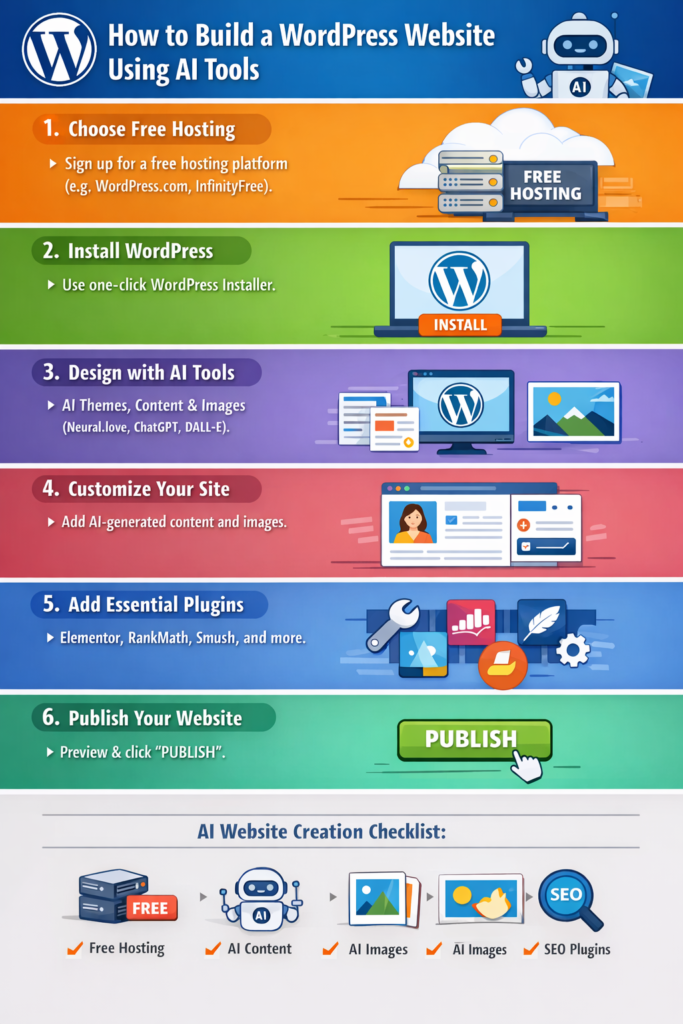
Step-by-Step Guide: Create a WordPress Website Using AI Tools
WordPress remains one of the most flexible platforms for website creation. Using AI tools alongside WordPress can make the process faster and easier.
Step 1: Choose a Free Hosting Platform
To start a zero-investment WordPress website, choose free hosting platforms such as:
WordPress.com Free Plan – offers a WordPress subdomain and free hosting.
InfinityFree – unlimited disk space and bandwidth with free WordPress installation.
AwardSpace – free hosting for small websites.
Step 2: Install WordPress
Most free hosting platforms offer one-click WordPress installation. Follow these steps:
Sign up on the hosting platform.
Navigate to the control panel (cPanel).
Select “Install WordPress” or “WordPress Installer.”
Choose your domain or subdomain (free hosting usually provides a subdomain).
Fill in admin details and click “Install.”
Step 3: Use AI Tools for Website Design
You can now integrate AI tools to design your WordPress website:
AI Theme Generators: Tools like Neural.love or Uizard can generate modern website templates.
AI Content Generators: Use ChatGPT, Copy.ai, or Writesonic to generate blog posts, product descriptions, and SEO-optimized content.
AI Image Generators: Tools like DALL·E or MidJourney create custom website images and banners.
Tip: Choose a lightweight WordPress theme like Astra or GeneratePress to ensure your AI-generated designs integrate smoothly.
Step 4: Customize Your Website
Log in to your WordPress dashboard.
Go to Appearance > Themes to install your preferred theme.
Use AI-generated content for pages like About Us, Services, and Contact.
Add images and graphics generated by AI image tools.
Use AI plugins like RankMath for SEO optimization.
Step 5: Add Essential Plugins
Even on a free WordPress plan, plugins enhance your site’s functionality. Recommended free plugins include:
Elementor: Drag-and-drop page builder.
Yoast SEO / RankMath: On-page SEO optimization.
Smush: Image optimization for faster loading.
UpdraftPlus: Backup solution for free WordPress sites.
Step 6: Publish Your Website
Once your AI-generated content, images, and layouts are ready:
Preview your website to ensure mobile responsiveness.
Fix any layout or content issues.
Click Publish to make your website live.
Your website is now fully functional with zero investment!
Tips for Maximizing AI Tools for Websites
Experiment With Multiple AI Tools: Combining AI design, content, and image generators can create a professional look without cost.
Focus on SEO: Use AI SEO tools like SurferSEO or RankMath for organic traffic growth.
Regularly Update Content: AI can generate fresh blog posts, keeping your website active and engaging.
Optimize for Speed: Even AI-generated websites can slow down; use caching plugins like LiteSpeed Cache for free performance optimization.
Leverage AI Analytics: Tools like Google Analytics and AI-based insights can help improve user engagement.
Free AI Tools Checklist for Website Building
| Tool Name | Purpose | Free Features |
| Wix ADI | Website generation | Free subdomain, templates, drag-and-drop editor |
| Bookmark AiDA | AI website creation | Responsive design, subdomain hosting |
| Zyro | Content & layout generation | AI content, logo creator, heatmaps |
| Jimdo Dolphin | Quick site creation | AI templates, SEO suggestions |
| Site123 | Beginner-friendly builder | Auto layouts, free subdomain |
| GoDaddy Builder | Marketing + website builder | AI content, free subdomain |
| ChatGPT | Content generation | Blog posts, product descriptions, SEO content |
| Copy.ai | Copywriting | Landing pages, product copy |
| Writesonic | AI content & marketing copy | Blog posts, social media content |
| DALL·E / MidJourney | Image generation | Custom website images & banners |
Conclusion
AI website builders have revolutionized how websites are made. With zero investment, beginners and entrepreneurs can now launch professional websites in a matter of minutes. By leveraging AI tools for design, content, SEO, and images, anyone can build an engaging online presence. Using WordPress alongside AI tools offers the flexibility and scalability needed to grow a website without spending money upfront.
You might be starting a blog, an e-commerce store, or a portfolio. AI tools combined with free WordPress hosting make it possible to create an impressive website. You can achieve this entirely for free. Embrace the power of AI and start building your digital presence today.
Download links
How to install How To Build A WordPress site with Zero Investment Using AI Tools APK?
1. Tap the downloaded How To Build A WordPress site with Zero Investment Using AI Tools APK file.
2. Touch install.
3. Follow the steps on the screen.